

Manage your jobs. Automate your reports. Run your business.
Rapporteo brings your clients, schedule, field jobs, photos, measurements, reports and business overview together in one platform, assisted by TEO.
Your trade. Your words. Your client’s language.
- Your trade’s vocabulary (inspection, visit, case…)
- Ready-to-use methods and checklists
- Tailored report template
- Automatic logo if you don’t have one
From the field visit to the final report, with no retyping.
Every piece of information is entered once. The client request feeds the schedule, the job feeds the report, the report feeds the invoice and your business overview.
- 01 Client request
- 02 Client relationship
- 03 Scheduling
- 04 Field job
- 05 Photos, measurements and methods
- 06 Report
- 07 TEO
- 08 Validation
- 09 PDF
- 10 Invoicing
- 11 Follow-up
- 12 Business overview
One platform, nine modules working together
Each module has a Rapporteo name. Together they cover the full cycle of your jobs, from the first call to payment.
Relations
Clients & relationships
Dispatch
Scheduling & dispatch
Missions
Jobs
Studio
Reports
TEO
AI agent
Vault
Documents
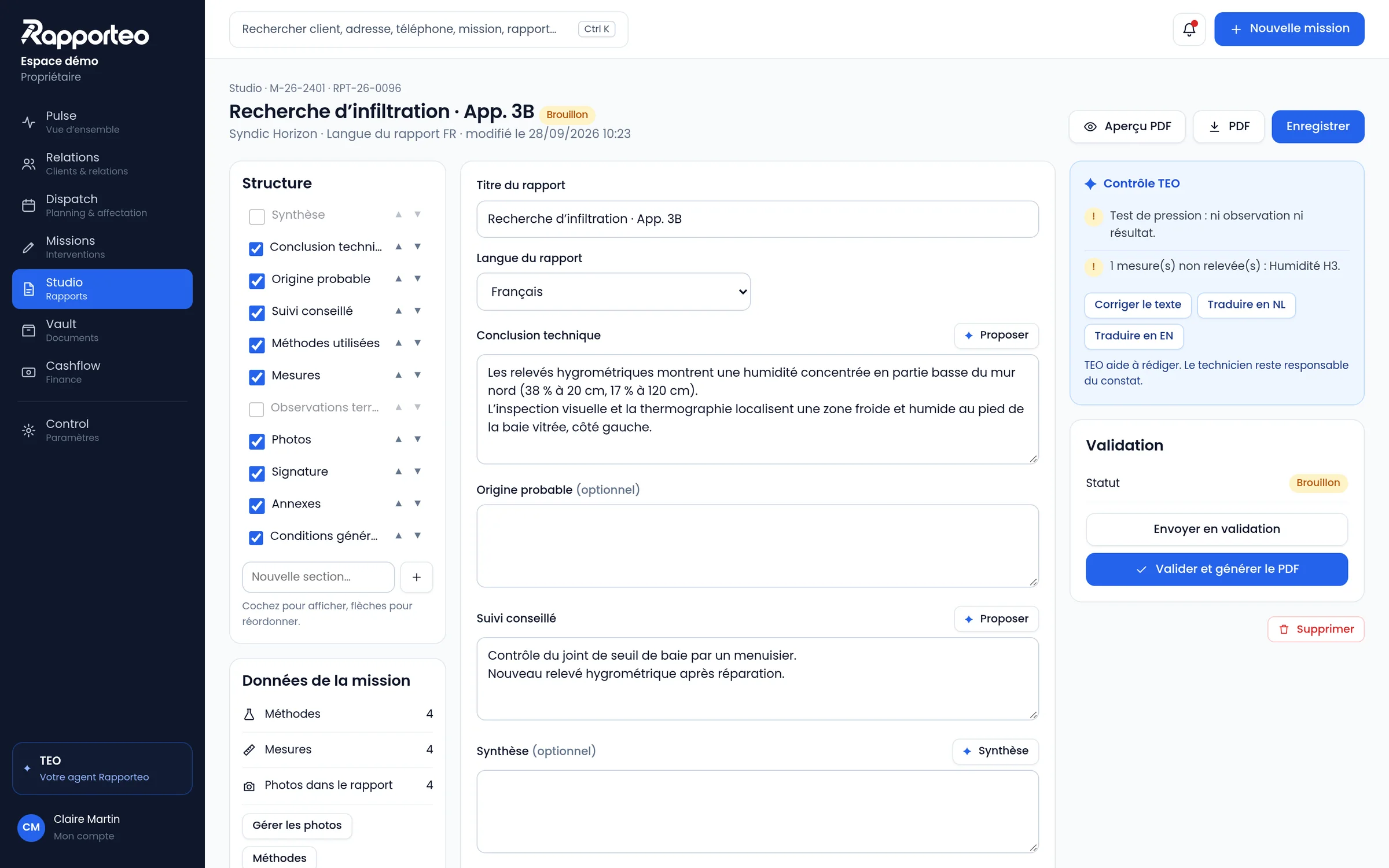
Field data is already in the report.
Photos, measurements, methods and observations come straight from the job. Studio turns them into a professional report that you review and validate.
- Report structure on the left, real preview in the centre
- Annotated photos, measurements and methods built in
- Quality check before validation
- Branded PDF in one click
TEO works inside your screen, not in a chat window.
TEO understands what you are doing. In a job, it works on the job. In Studio, on the report. In Relations, on the client.
- Turns a voice note into professional text
- Spots photos without captions and missing measurements
- Drafts a conclusion from the data that is there
- Flags an unconfirmed appointment or an overdue invoice
TEO helps you write. The technician remains responsible for the findings.
In a job
In Studio
In Relations
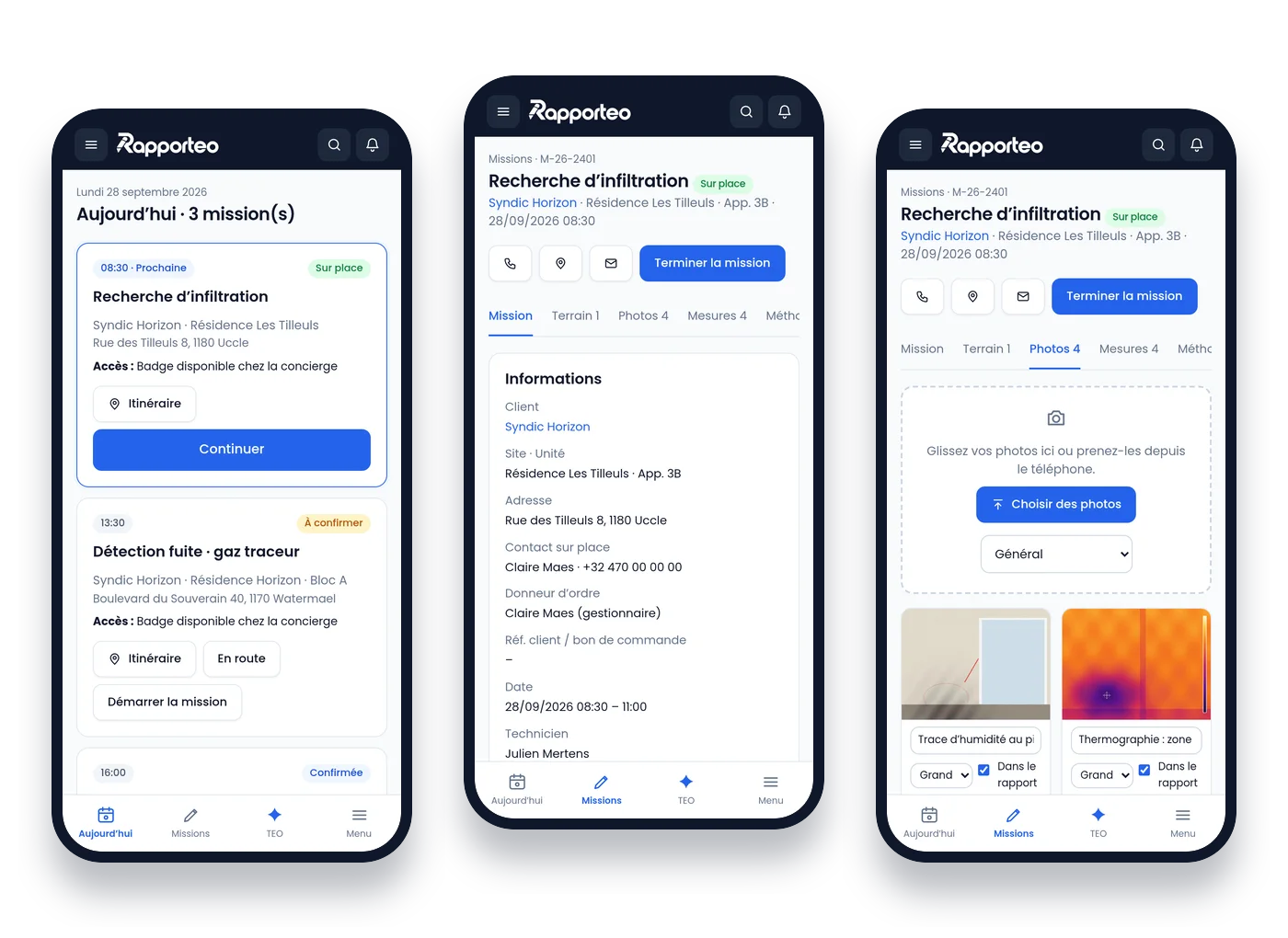
The technician opens the job and has everything they need.
An app built for the field, not a shrunken office version. It works without signal and syncs once the connection is back.
- Today’s jobs, access details and on-site contacts
- Guided methods, required measurements and photos
- Voice notes rewritten by TEO, then validated
- Client signature and sign-off on site
- Offline mode
Everyone gets Rapporteo from the first minute
Business owner
“This is where I manage my clients, my team, my jobs, my reports and my business.”
Technician
“I open my job and immediately have everything I need.”
Report manager
“Field data is already in Studio and TEO helps me produce a professional report.”
Peppol invoicing and three languages from day one.
Rapporteo is designed for Belgian businesses: structured e-invoicing and an interface in French, Dutch and English.
Cashflow and Peppol
Your invoices are sent in a structured format through a certified Peppol service provider, with every status tracked.
- Statuses sent, delivered, accepted, rejected, paid
- Company number, VAT and client and job references
- Planned connections: Billit, accounting, Stripe, bank
FR, NL and EN
The app, forms, TEO, notifications and reports are available in all three languages.
- Interface language chosen by each user
- Report language independent from the app language
- Translation suggested by TEO, validated by you
Rapporteo adapts to the methods of your trade
Each trade has its own fields, methods, checklists and report templates.
“The CRM serves the job, not the other way round.”
Simple plans to start, room to grow.
Prices excl. VAT. 14-day free trial, no credit card.
Solo
€39
Pro
€89
Team
€149
Business
€249
What’s new
What just arrived in Rapporteo, update after update.
See the client area as your client does
From the client record, one button opens the client area exactly as your client sees it: jobs, reports, invoices and shared documents. Read-only, nothing changes on their side.
Documents: every file in its place
One folder per job, client and building, with categories (request, media, plans, quotes, reports, billing), successive versions, internal or client-shared documents, grouped ZIP download and a “To file” list for attachments received by e-mail.
Directions in one move
Pick Waze, Google Maps or Apple Maps and remember your choice: the navigation app opens straight away and the job switches to “On the way”.
Let’s build Rapporteo with the first field teams.
Show us how you work today. We’ll show you how Relations, Missions, Studio and TEO can make it simpler.